



CE496 Graduation Project
This page explains the registration process for the CE496 Graduation Project course, the schedule followed every semester, and the writing guidelines and templates you will use throughout your project.
Who Can Take the Course?
To take CE496, you must meet two conditions. First, you must have completed at least 200 ECTS credits. Second, you must have passed the prerequisite course set by the faculty member you wish to work with. Each faculty member has a different prerequisite course; the current list is given in the Faculty Members and Prerequisite Courses table attached to this page. Faculty members and prerequisite courses may change from semester to semester; the attachment is updated each semester before applications open, and only the current list published for the relevant semester is valid.
Application and Placement Process
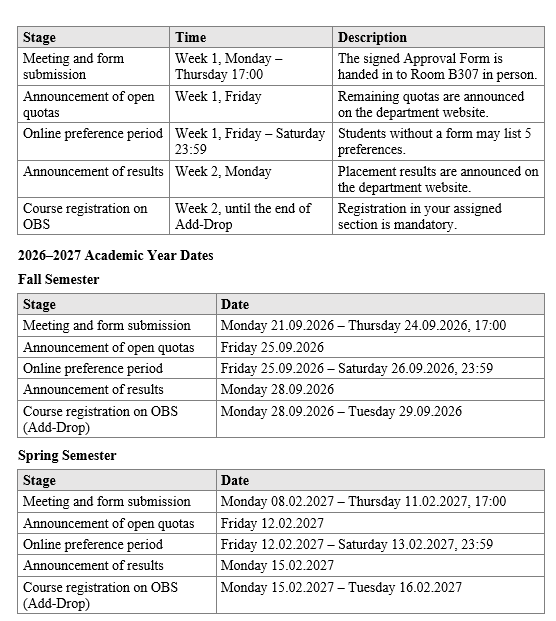
The process runs in three stages every fall and spring semester. Weeks are counted from the first week of classes as shown in the Academic Calendar.
Stage 1: Meeting with a faculty member and form submission (Week 1, Monday – Thursday)
Meet in person with the faculty member you wish to work with, bringing your current transcript, and have them sign the [Graduation Project Approval Form]. Hand in the signed form to Room B307 in person, against signature, no later than 17:00 on Thursday of Week 1. Students who submit the form are assigned directly to that faculty member without entering the central preference system.
Stage 2: Online preference system (Week 1, Friday – Saturday)
For students who do not or cannot submit a form, the remaining open quotas are announced on the department website on Friday of Week 1. In the online preference system, which opens the same day, you may upload your transcript and list up to 5 faculty members in order of priority. The system closes at 23:59 on Saturday. Students who are not placed in any of their preferences are assigned to open quotas based on their division and transcript.
Stage 3: Announcement of results and course registration on OBS (Week 2)
Placement results are announced on the department website on Monday of Week 2. After the results, you must register on OBS for the section of the faculty member you have been assigned to before the Add-Drop period ends.
Process Schedule
The schedule below is applied in the same way every fall and spring semester. For the start of classes and the Add-Drop period, please see the Academic Calendar.
Important Notes
Prerequisite requirement: If you have not passed a faculty member's prerequisite course, you cannot work with that faculty member. Only quotas whose prerequisites you meet are considered in placement.
Transcript: You must bring your current transcript to your meetings with faculty members and upload it to the system during the online preference period.
Students who agree with a faculty member before the semester: Even if you have agreed to work with a faculty member before the semester begins, you must still submit the Approval Form to Room B307 during Week 1 (by Thursday 17:00). You must also notify Room B307 of this arrangement before the semester starts.
Registering in the correct section: Students who register in a section other than that of their assigned faculty member, or who do not select the correct section in time, will have their course registration deleted by the system.
Project Report and Presentation
Graduation project reports are prepared according to the common formatting rules set by our department. Before you start writing, we recommend reading the [Graduation Project Writing Guide]; it explains the report sections, page layout, presentation of figures and tables, and citation rules.
Writing your report on the [Graduation Project Report Template], instead of formatting it from scratch, saves time and makes it easier to comply with the guide. Add only your own content, without changing the template's heading, font and page settings.
Prepare your project presentation using the [Graduation Project Presentation Template]. Using the same template for all students keeps presentations consistent and suitable for evaluation.
Contact
For questions about the process: Room B307
Attachment: Faculty Members and Prerequisite Courses